
What to Ask Before Choosing a Real Estate CRM Partner
Explore 10 essential questions to evaluate a real estate CRM implementation partner, from industry expertise and data migration to integration capabilities and long-term support.


Posted By admin
 Oct 12, 2026
 12:12:33pm
 A Microsoft Dynamics 365 rollout for a real estate developer succeeds or fails on what gets configured before go-live. Licences, a sandbox and a trained vendor team do not make a CRM ready for a sales launch. Project and unit structures, sales stages, payment plans, security roles, integrations and clean migrated data do.
The stakes are high: research on real estate CRM cites CRM failure rates of up to 70%.
Most developer CRM problems that surface in the first month after launch trace back to a configuration decision nobody made. A unit status that means two different things. A broker who can see another broker’s leads. A payment plan template that does not match the sales and purchase agreement. Each one is cheaper to fix in a sandbox than in front of a buyer.
This guide sets out what a developer needs to configure in Dynamics 365 before go-live, using Property-xRM, the real estate CRM built on Microsoft Dynamics 365 Customer Engagement, as the reference point. It closes with a go-live checklist your project team can use in its final readiness review.
Standard Dynamics 365 Sales is built around accounts, contacts, leads and opportunities. A developer sells something different: a specific unit, in a specific building, inside a specific project, on a specific payment plan, often before construction is finished.
That changes what has to be ready on day one:
Generic CRM configuration covers none of this by default. It needs either heavy customisation or a real estate layer such as Property-xRM, which adds project, unit, booking, payment plan and handover structures on top of Dynamics 365. For a broader view of how the platform fits developers, see Microsoft Dynamics 365 CRM for real estate developers.
The inventory hierarchy is the first thing to lock down, because every sales, finance and handover record hangs off it. Changing it after go-live means remapping live bookings.
Agree and configure:
The test before go-live is simple. Two users try to reserve the same unit at the same moment, and only one succeeds. Property-xRM’s real estate inventory management handles unit availability and matching inside Dynamics 365, so the rules above become configuration rather than custom code.
The sales process configuration decides whether the CRM reflects how the sales floor actually works. Map it end to end before anyone builds a form.
Three configuration points cause most post-launch rework:
Property-xRM configures the lead-to-sale workflow, inventory matching, payment plans, contracts and receipts as one connected process, so the record a sales executive creates at reservation is the same record finance and handover teams work from later. For a closer look at the buyer side of this journey, read how to use your CRM to manage the buyer’s journey.
For developers that sell through agencies, broker setup must be finished before launch, not added after the first commission dispute.
Configure:
Property-xRM’s real estate broker management covers broker onboarding, lead registration and commission tracking inside the same CRM the internal sales team uses.
One of the strongest reasons developers choose Dynamics 365 is that it works natively with the Microsoft tools their teams already use. Those integrations still need to be switched on, configured and tested before go-live.
| Integration | What to configure | What to test before go-live |
|---|---|---|
| Outlook | Server-side synchronisation of email, appointments and tasks; the Dynamics 365 app for Outlook | Emails to a buyer appear on the right record; tracked meetings sync both ways |
| Teams | Linking Teams chats and channels to CRM records; collaboration on deals | A sales executive can open and update a record from Teams |
| SharePoint | Document storage for KYC files, booking forms and contracts, with folder structure by project and unit | Documents upload to the correct record and respect security roles |
| Excel | Export templates and Excel Online editing for approved users | Bulk edits respect validation and audit rules |
| ERP | Customer, unit, booking, contract, invoice and receipt data exchange | Each data object has one system of record and failed syncs raise an alert |
The ERP integration deserves the most attention. Decide which system owns each piece of data. In most developer setups, the CRM owns the customer, unit status and booking, and the ERP owns invoices, receipts and the general ledger. Then define how often data moves, what happens when a sync fails and who is notified.
Property-xRM supports native integration with Excel, Outlook, Teams and SharePoint, and connects with third-party ERP systems. More detail on integration approaches is in real estate software integration.
Automation should be configured for the moments that cost sales or create risk, not for every possible trigger. Too many automated emails and alerts on day one teach users to ignore all of them.
Prioritise these before go-live:
Agree the go-live dashboard set with sales leadership in advance, and check each figure against a known source, such as the current booking register. If the first report a director opens shows a number that does not match, confidence in the whole system drops.
A useful rule is to automate the lightest way that works. A business rule is easier to maintain than a flow, and a flow is easier to maintain than custom code. Property-xRM uses Power Apps, Power Automate and Power BI for automation and analysis, so these components sit inside the same Microsoft environment as the CRM itself.
Dynamics 365 controls who sees what through business units, security roles, teams and field-level security. For developers, this structure usually mirrors projects and departments, and it is hard to restructure once records exist.
Define before go-live:
Test each role by logging in as a real user in that role. An administrator account sees everything, so it cannot confirm that a broker sees only what they should. If Property-xRM’s leasing, facilities or community modules are planned for a later phase, design the business unit structure now so those teams can be added without rework.
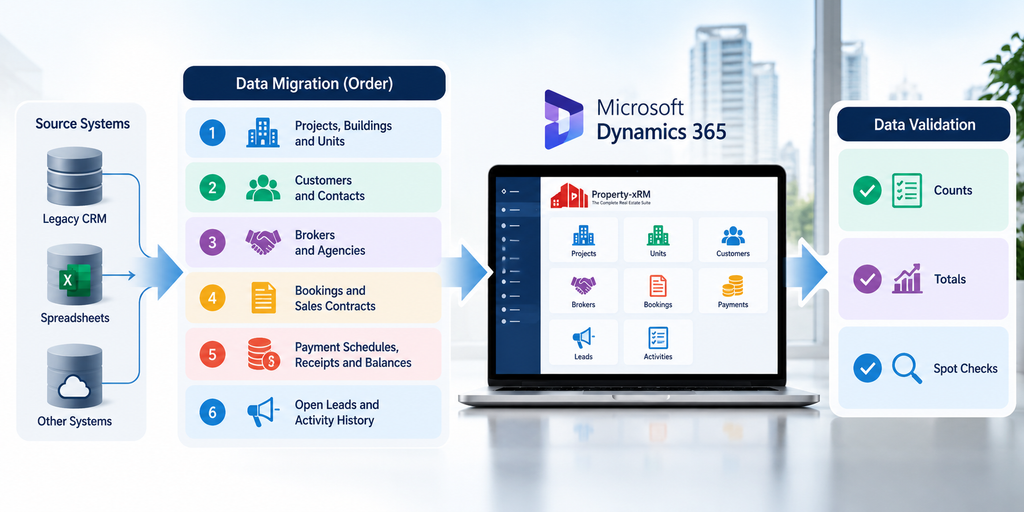
Migrated data is the first thing users judge the new CRM by. A sales executive who opens a buyer record and finds the wrong unit or a missing payment will go back to the old spreadsheet.
Plan migration in this order, because each layer depends on the one before it:
Then validate in three ways:
Run at least one full trial migration in a test environment before the final one. It shows how long the real cutover will take and which mapping rules still break. Decide too what will not be migrated, such as very old closed leads, and where that history will remain accessible.
If buyers or site teams will use self-service tools from day one, those tools need the same readiness checks as the core CRM. A buyer who cannot log in to see their statement calls the sales team instead.
For the customer portal, confirm:
For the handover mobile app, confirm:
Property-xRM includes a customer portal and mobile apps for property handover, snagging and orientation, with offline capability for site teams. The checklist in 5 key steps for success with property handover software is a useful companion for this stage. Many developers phase the portal and handover app after the sales go-live; if so, record that decision in the go-live plan so nobody expects them on day one.
A developer’s CRM keeps changing after go-live, with new projects, new payment plans and new launches. The environment setup decides whether those changes are safe.
Before go-live, put in place:
This section rarely appears in sales demos, but it is where a CRM becomes maintainable. It also lets a new project be set up as configuration, without a fresh development cycle each time.
A CRM that is configured correctly but not used correctly fails just as surely as one that is misconfigured. Training should be built around roles and daily tasks, not around screens.
One familiar advantage helps here. Dynamics 365 shares the Microsoft interface conventions of Outlook, Teams and Excel, which shortens the learning curve for teams that already work in Microsoft 365. Adoption still needs planning, and why real estate CRM adoption fails covers the most common reasons.
User acceptance testing (UAT) is where the business, not the implementation team, confirms the CRM is ready. Write test scripts as complete business scenarios rather than isolated features. For example: a broker registers a lead, the buyer visits the site, reserves a unit, books it on a post-handover payment plan, pays the first instalment and receives a receipt. Every role in that chain signs off its own step.
Plan the cutover as a short, rehearsed sequence:
Use this checklist in the final go/no-go meeting:
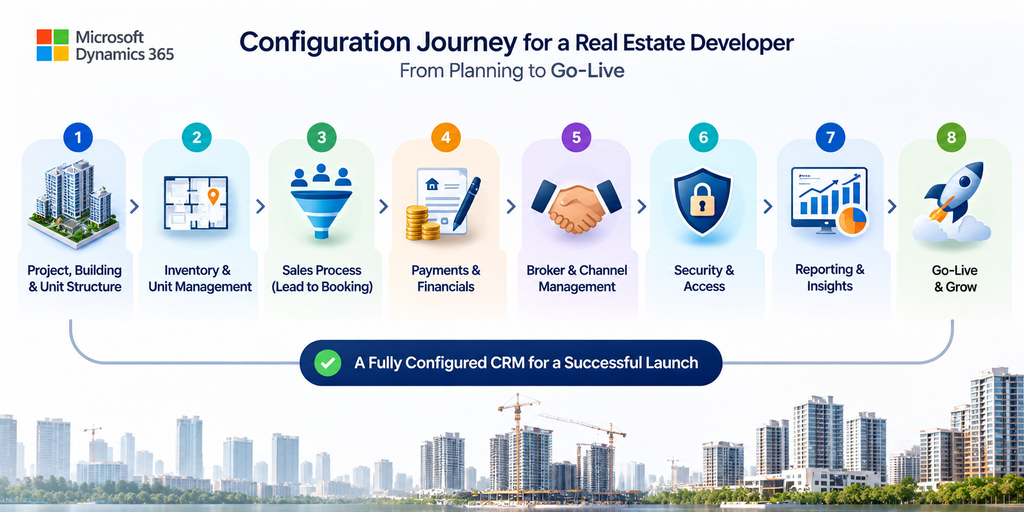
A successful Dynamics 365 go-live for a real estate developer comes down to configuring the real estate structures first: inventory, the lead-to-booking-to-contract process, payment plans, brokers and access. Integrations, automation, migration, training and testing then make those structures reliable from the first day of sales.
Property-xRM brings these real estate structures to Microsoft Dynamics 365 as one centralised CRM for developers. Metadata Technologies, a Microsoft Solutions Partner, has delivered 100+ implementations across 12+ countries, including for developers such as Alef Group.
Planning a Dynamics 365 rollout or a new project launch? Talk to the Property-xRM team about what your go-live needs.

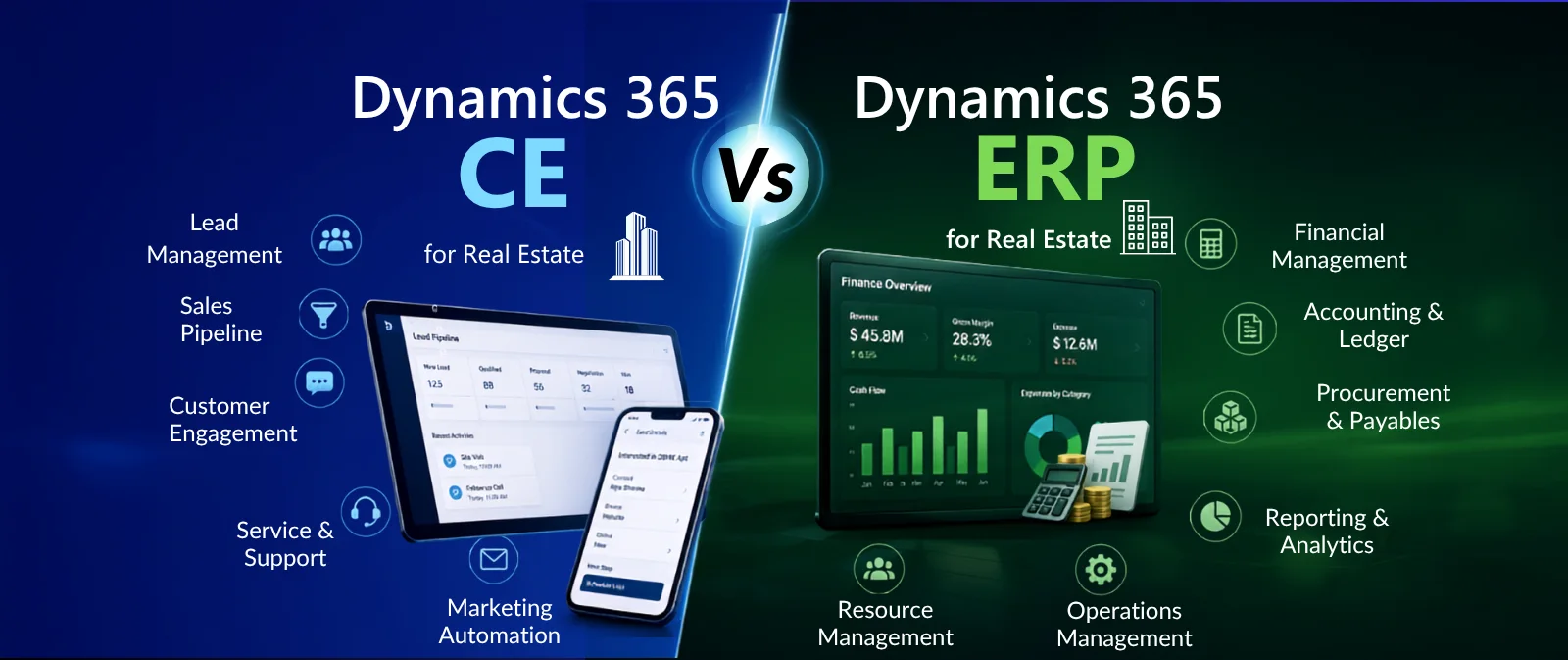
Not as a standard application. Microsoft offers Dynamics 365 Sales, Customer Service, Field Service and Finance as general business applications, and none of them includes projects, units, reservations, payment plans or broker commission out of the box. Microsoft relies on its partner ecosystem for industry depth, so developers add a vertical real estate solution on top of Dynamics 365. Property-xRM is that solution: a real estate CRM built on Dynamics 365 Customer Engagement and listed on Microsoft AppSource, giving developers the Microsoft platform they already trust plus the real estate structures it lacks.
There are two routes. The first is to build custom tables, forms and workflows yourself, which gives full control but means designing, testing and maintaining every real estate process, and regression testing that custom code against each Microsoft update. The second is to install an industry solution that already models real estate. Property-xRM installs as a Dynamics 365 solution, so the developer-specific layer for inventory, bookings, payment plans, brokers and handover arrives ready, and the project team configures it to your projects instead of building from a blank page.
For most developers, buying is the lower-risk choice. A custom build often looks cheaper at the start, but the costs appear later: specifying the sales process from scratch, fixing gaps found during UAT and maintaining custom code for years. A vertical solution shortens the path to go-live because the core real estate structures already exist and have been tested in live projects. Property-xRM has been refined through 100+ implementations across 12+ countries, so a developer starts from proven patterns rather than an untested design.
Timelines depend on scope more than on the software. The main factors are the number of projects and legal entities, how many modules go live together, the quality of legacy data and the number of integrations, especially with the ERP. A sales-first go-live with clean inventory data moves far faster than a single launch covering sales, leasing, facilities and a customer portal. Starting from a real estate solution instead of a custom build also removes the longest design phase. The Property-xRM team scopes a phased plan in the first workshops so each go-live date is realistic and tied to a sales launch the business can plan around.
Most failures come from decisions, not technology: an inventory structure agreed too late, payment plans that do not match contracts, an ERP integration with no agreed system of record, migrated data that does not reconcile with finance, and users trained on screens instead of daily tasks. Generic CRM partners often learn real estate processes during the project, which is exactly when these gaps surface. Property-xRM implementations are led by a team focused entirely on real estate CRM, so these decisions are raised in the first workshops rather than discovered in UAT.
Yes, and it is often the safest route. Launching sales first lets the team stabilise the most time-critical process before adding more users and data. Property-xRM covers residential sales, residential and commercial leasing, facilities management, owner associations, a customer portal and handover apps on the same Dynamics 365 foundation, so later phases add modules to the same customer and unit records instead of introducing another system. The one condition is to design business units and security roles at the start with those later phases in mind.
Yes. Property-xRM integrates natively with Microsoft tools including Outlook, Teams, SharePoint, Excel, Power Apps, Power Automate, Power BI and Microsoft Copilot, and it also integrates with non-Microsoft ERP systems such as Oracle and SAP. Developers do not need to replace their finance system to adopt it. As part of the implementation, the team agrees which system owns each record, how often data moves and who is alerted when a sync fails, so sales and finance always see the same booking and payment status.
Yes. Metadata Technologies has implemented Property-xRM for developers across the GCC, including Alef Group in Sharjah. The solution handles the workflows that define GCC developer sales, such as off-plan and post-handover payment plans, broker-led project launches, multi-project inventory and handover with snagging. The same model also supports developers in APAC and North America, which helps groups operating in more than one market keep one centralised CRM.
CRM manages customer relationships: leads, contacts, accounts and opportunities. xRM, often read as “anything relationship management”, uses the same Dynamics platform to manage any entity a business depends on, such as projects, buildings, units, brokers, contracts and assets. Real estate needs the xRM approach because the unit matters as much as the customer. Property-xRM applies this approach to real estate, linking every buyer, broker, booking and payment to the unit it belongs to.
A generic partner brings Dynamics 365 skills. Property-xRM brings Dynamics 365 skills, a ready real estate product and a team that works only on real estate CRM. Metadata Technologies is a Microsoft Solutions Partner with 100+ implementations across 12+ countries, which means:
Talk to the Property-xRM team to plan a go-live that is right first time.